
Bài Viết
Sharecode bắt buộc xác minh tài khoản người dùng qua OTP gmail miễn phí


Chào mừng bạn đến với thế giới “xác minh” – nơi mỗi cú click là một niềm vui và mỗi mã OTP là một “bí kíp thần kỳ”! Chắc hẳn bạn đang tìm cách triển khai tính năng OTP xác minh tài khoản sao cho dễ dùng mà vẫn bảo mật. Hãy cùng nhau “hack” chút niềm vui vào tính năng này nhé!
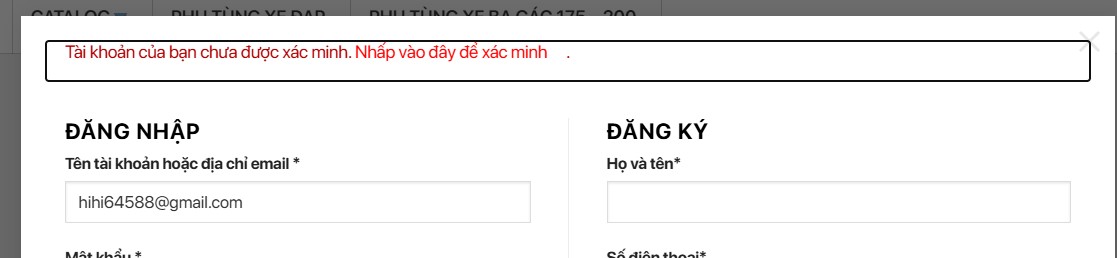
1. Tạo Shortcode OTP Verification Form (Mẫu Xác Minh OTP)
Shortcode này sẽ giúp bạn tạo ra một mẫu xác minh OTP để khách hàng có thể nhập mã vào, với giao diện dễ thương và thân thiện như những món quà bất ngờ. Chỉ cần thả shortcode này vào bất cứ nơi nào bạn muốn hiển thị mẫu OTP, và khách hàng sẽ cảm thấy mình đang bước vào một trò chơi thú vị hơn là một thủ tục xác minh khô khan.
1 2 3 4 5 6 7 8 9 10 11 12 13 14 15 16 17 18 19 20 21 22 23 24 25 26 27 28 29 30 31 32 33 34 35 36 37 38 39 40 41 42 43 44 45 46 47 48 49 50 51 52 53 54 55 56 57 58 59 60 61 62 63 64 65 66 67 68 69 70 71 72 73 74 | add_shortcode('otp_verification_form', 'otp_verification_form_shortcode'); function otp_verification_form_shortcode() { ob_start(); ?> <style> #otp-verification-container { max-width: 400px; margin: 0 auto; padding: 20px; border: 1px solid #ddd; border-radius: 8px; background-color: #f9f9f9; box-shadow: 0 2px 4px rgba(0, 0, 0, 0.1); } #otp-form { display: none; margin-top: 15px; } #otp-form label { display: block; margin-bottom: 8px; font-weight: bold; } #otp-form input[type="text"] { width: calc(100% - 20px); padding: 10px; margin-bottom: 10px; border: 1px solid #ddd; border-radius: 4px; } #otp-form input[type="submit"] { background-color: #3085d6; color: #fff; border: none; padding: 10px 20px; border-radius: 4px; cursor: pointer; font-size: 16px; } #otp-form input[type="submit"]:hover { background-color: #2874a6; } #send-otp-btn, #resend-otp-btn { background-color: #3085d6; color: #fff; border: none; padding: 10px 20px; border-radius: 4px; cursor: pointer; font-size: 16px; } #send-otp-btn:hover, #resend-otp-btn:hover { background-color: #2874a6; } #countdown { margin-top: 15px; font-size: 16px; color: #ff0000; } </style> <div id="otp-verification-container"> <form id="otp-form" method="post" style="display: none;"> <input type="hidden" name="user_id" id="user_id" value="<?php echo esc_attr($_GET['user_id']); ?>"> <label for="otp"><?php _e('Nhập mã OTP của bạn'); ?></label> <input type="text" id="otp" name="otp" required> <input type="submit" name="submit_otp" value="<?php _e('Xác minh'); ?>"> </form> <button id="send-otp-btn"><?php _e('Gửi mã OTP'); ?></button> <button id="resend-otp-btn" style="display: none;"><?php _e('Gửi lại mã OTP'); ?></button> <div id="countdown" style="display: none;"></div> </div> <?php return ob_get_clean(); } |
2. Kịch Bản JavaScript – Đếm Ngược và Gửi Mã OTP
Cái này là phần “ma thuật” sẽ khiến trải nghiệm xác minh OTP trở nên thú vị. Bằng cách thêm một bộ đếm ngược, chúng ta tạo cảm giác hồi hộp, giống như đang chờ một tin nhắn bí mật! Hãy chắc chắn bạn đã thêm JavaScript để kích hoạt nút gửi mã OTP và nút gửi lại OTP.
1 2 3 4 5 6 7 8 9 10 11 12 13 14 15 16 17 18 19 20 21 22 23 24 25 26 27 28 29 30 31 32 33 34 35 36 37 38 39 40 41 42 43 44 45 46 47 48 49 50 51 52 53 54 55 56 57 58 59 60 61 62 63 64 65 | add_action('wp_footer', 'otp_verification_scripts'); function otp_verification_scripts() { if (is_page('verify-account')) { // Chỉ áp dụng cho trang xác minh ?> <script> document.addEventListener('DOMContentLoaded', function () { const sendOtpBtn = document.getElementById('send-otp-btn'); const resendOtpBtn = document.getElementById('resend-otp-btn'); const countdownDiv = document.getElementById('countdown'); const otpForm = document.getElementById('otp-form'); const userId = document.getElementById('user_id').value; function sendOtp() { countdownDiv.style.display = 'block'; let countdown = 60; const interval = setInterval(function () { countdownDiv.textContent = `Vui lòng chờ để chúng tôi gửi mã OTP trong ${countdown} giây!`; countdown--; if (countdown < 0) { clearInterval(interval); countdownDiv.textContent = 'Gửi mã OTP rồi đó, kiểm tra email nha!'; fetch('<?php echo admin_url('admin-ajax.php'); ?>', { method: 'POST', headers: { 'Content-Type': 'application/x-www-form-urlencoded' }, body: new URLSearchParams({ action: 'send_otp_via_ajax', user_id: userId }) }).then(response => response.text()).then(result => { countdownDiv.textContent = 'Mã OTP đã được gửi đến email của bạn.'; otpForm.style.display = 'block'; sendOtpBtn.style.display = 'none'; resendOtpBtn.style.display = 'block'; localStorage.setItem('last_otp_time', new Date().getTime()); }).catch(error => { countdownDiv.textContent = 'Đã xảy ra lỗi. Vui lòng thử lại.'; }); } }, 1000); } sendOtpBtn.addEventListener('click', sendOtp); resendOtpBtn.addEventListener('click', function () { const lastOtpTime = localStorage.getItem('last_otp_time'); if (lastOtpTime && (new Date().getTime() - lastOtpTime < 60000)) { alert('Vui lòng chờ ít nhất 1 phút trước khi gửi lại mã OTP.'); return; } sendOtp(); }); const lastOtpTime = localStorage.getItem('last_otp_time'); if (lastOtpTime && (new Date().getTime() - lastOtpTime < 60000)) { resendOtpBtn.style.display = 'block'; } }); </script> <?php } } |
3. Gửi Mã OTP Qua AJAX
Đây là phần mà mọi người thích, khi bạn nhấn vào nút gửi mã OTP, hệ thống sẽ tạo một mã OTP “siêu bí mật” với 10 số, 1 chữ cái và 1 ký tự đặc biệt. Mã OTP này sẽ được gửi qua email của bạn – giống như một sứ mệnh đặc biệt chỉ dành riêng cho bạn vậy!
1 2 3 4 5 6 7 8 9 10 11 12 13 14 15 16 17 18 19 20 21 22 23 24 25 26 | add_action('wp_ajax_send_otp_via_ajax', 'send_otp_via_ajax'); add_action('wp_ajax_nopriv_send_otp_via_ajax', 'send_otp_via_ajax'); function send_otp_via_ajax() { $user_id = intval($_POST['user_id']); $numbers = '0123456789'; $letters = 'abcdefghijklmnopqrstuvwxyzABCDEFGHIJKLMNOPQRSTUVWXYZ'; $special_chars = '!@#$%^&*()_+[]{}|;:,.<>?'; $otp = ''; $otp .= substr(str_shuffle($numbers), 0, 10); // 10 số $otp .= substr(str_shuffle($letters), 0, 1); // 1 chữ cái $otp .= substr(str_shuffle($special_chars), 0, 1); // 1 ký tự đặc biệt $otp = str_shuffle($otp); update_user_meta($user_id, 'account_otp', $otp); update_user_meta($user_id, 'otp_sent_time', time()); $user = get_userdata($user_id); $subject = "Mã OTP của bạn"; $message = "Mã OTP của bạn là: $otp"; wp_mail($user->user_email, $subject, $message); wp_die(); } |
4. Xác Minh Mã OTP – Vòng Cuối Cùng Để Chiến Thắng
Phần này là “vòng chung kết” trong cuộc hành trình xác minh OTP. Lúc này, khách hàng của bạn đã nhận mã OTP, và chỉ cần nhập đúng mã để hoàn tất xác minh. Phần này kiểm tra xem mã OTP người dùng nhập có khớp với mã đã gửi qua email không. Nếu đúng và còn trong thời hạn, ta sẽ mở khóa, trao huy chương “Tài khoản đã xác minh” cho họ!
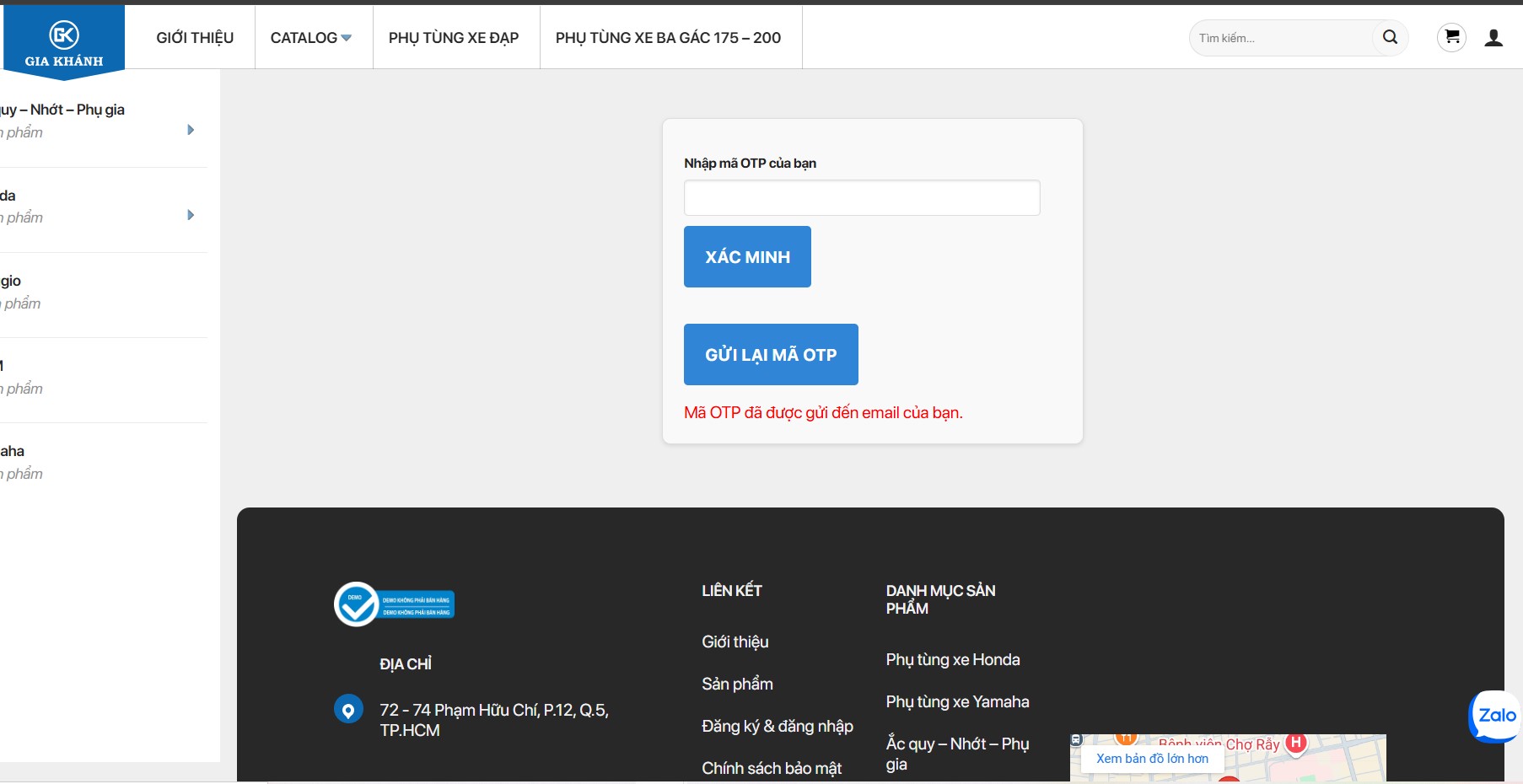
Nếu mã không đúng, hoặc thời gian đã hết hạn, khách hàng sẽ được đưa ra ngoài để thử lại hoặc chờ thêm chút thời gian trước khi gửi lại mã.
1 2 3 4 5 6 7 8 9 10 11 12 13 14 15 16 17 18 19 20 21 22 23 24 25 26 | add_action('init', 'verify_otp_account'); function verify_otp_account() { if (isset($_POST['submit_otp'])) { $user_id = intval($_POST['user_id']); $otp = sanitize_text_field($_POST['otp']); $saved_otp = get_user_meta($user_id, 'account_otp', true); $otp_sent_time = get_user_meta($user_id, 'otp_sent_time', true); if ($saved_otp && $saved_otp === $otp) { // Kiểm tra thời gian hết hạn OTP (ví dụ: 10 phút) if (time() - $otp_sent_time > 600) { wp_redirect(home_url('/xac-minh-that-bai')); // Hết thời hạn mã OTP exit; } update_user_meta($user_id, 'account_verified', true); // Cập nhật trạng thái xác minh delete_user_meta($user_id, 'account_otp'); // Xóa mã OTP đã dùng delete_user_meta($user_id, 'otp_sent_time'); // Xóa thời gian gửi mã wp_redirect(home_url('/xac-minh-thanh-cong')); // Chuyển đến trang thành công exit; } else { wp_redirect(home_url('/xac-minh-that-bai')); // Mã OTP không chính xác exit; } } } |
Giải thích chi tiết:
- Lấy mã OTP và thời gian gửi từ cơ sở dữ liệu.
- So sánh mã OTP đã nhập với mã đã gửi:
- Nếu khớp và thời gian chưa hết hạn (10 phút ở đây), thì xác minh thành công.
- Nếu mã sai hoặc hết thời gian, chuyển hướng đến trang xác minh thất bại.
- Cập nhật trạng thái xác minh: Nếu xác minh thành công, trạng thái tài khoản sẽ được đánh dấu là “Đã xác minh”, và mã OTP cũng như thời gian gửi sẽ bị xóa để giữ cho tài khoản gọn gàng và bảo mật.
Với quy trình này, bạn đã hoàn thành việc thiết lập một hệ thống xác minh OTP thân thiện, bảo mật và dễ dùng.
Dưới đây là mã hoàn chỉnh, chỉ cần bỏ vào funtion là được nè, chức mấy iu của chế thành công nhé. Thấy hay hãy cho xin 5 sao ủng hộ tui nhé bà con ơi. Đăng ký tài khoản để xem code hoàn chỉnh nhé bà con
[an]1 2 3 4 5 6 7 8 9 10 11 12 13 14 15 16 17 18 19 20 21 22 23 24 25 26 27 28 29 30 31 32 33 34 35 36 37 38 39 40 41 42 43 44 45 46 47 48 49 50 51 52 53 54 55 56 57 58 59 60 61 62 63 64 65 66 67 68 69 70 71 72 73 74 75 76 77 78 79 80 81 82 83 84 85 86 87 88 89 90 91 92 93 94 95 96 97 98 99 100 101 102 103 104 105 106 107 108 109 110 111 112 113 114 115 116 117 118 119 120 121 122 123 124 125 126 127 128 129 130 131 132 133 134 135 136 137 138 139 140 141 142 143 144 145 146 147 148 149 150 151 152 153 154 155 156 157 158 159 160 161 162 163 164 165 166 167 168 169 170 171 172 173 174 175 176 177 178 179 180 181 182 183 184 185 186 187 188 189 190 191 192 193 194 195 196 197 198 199 200 201 202 203 204 205 206 207 208 209 210 211 212 213 214 215 216 217 218 219 220 221 222 223 224 225 226 227 228 229 230 231 232 233 234 235 236 237 238 239 240 241 242 243 244 245 246 247 248 249 250 251 252 253 254 255 256 257 258 259 260 261 262 263 264 265 266 267 268 269 270 271 272 273 274 275 276 277 278 279 280 281 282 283 284 285 286 287 288 289 290 291 292 293 294 295 296 297 298 299 300 301 302 303 304 305 306 307 308 309 310 311 312 313 314 315 316 317 318 319 320 321 322 323 324 325 326 327 328 329 330 331 332 333 334 335 336 337 338 339 340 341 342 343 344 345 346 347 348 349 350 351 352 353 354 355 356 357 358 359 360 361 362 363 364 365 366 367 368 369 370 371 372 373 374 375 376 377 378 379 380 381 382 383 384 385 386 | // Tạo shortcode để hiển thị biểu mẫu OTP và nút gửi mã add_shortcode('otp_verification_form', 'otp_verification_form_shortcode'); function otp_verification_form_shortcode() { ob_start(); ?> <style> #otp-verification-container { max-width: 400px; margin: 0 auto; padding: 20px; border: 1px solid #ddd; border-radius: 8px; background-color: #f9f9f9; box-shadow: 0 2px 4px rgba(0, 0, 0, 0.1); } #otp-form { display: none; margin-top: 15px; } #otp-form label { display: block; margin-bottom: 8px; font-weight: bold; } #otp-form input[type="text"] { width: calc(100% - 20px); padding: 10px; margin-bottom: 10px; border: 1px solid #ddd; border-radius: 4px; } #otp-form input[type="submit"] { background-color: #3085d6; color: #fff; border: none; padding: 10px 20px; border-radius: 4px; cursor: pointer; font-size: 16px; } #otp-form input[type="submit"]:hover { background-color: #2874a6; } #send-otp-btn, #resend-otp-btn { background-color: #3085d6; color: #fff; border: none; padding: 10px 20px; border-radius: 4px; cursor: pointer; font-size: 16px; } #send-otp-btn:hover, #resend-otp-btn:hover { background-color: #2874a6; } #countdown { margin-top: 15px; font-size: 16px; color: #ff0000; } </style> <div id="otp-verification-container"> <form id="otp-form" method="post" style="display: none;"> <input type="hidden" name="user_id" id="user_id" value="<?php echo esc_attr($_GET['user_id']); ?>"> <label for="otp"><?php _e('Nhập mã OTP của bạn'); ?></label> <input type="text" id="otp" name="otp" required> <input type="submit" name="submit_otp" value="<?php _e('Xác minh'); ?>"> </form> <button id="send-otp-btn"><?php _e('Gửi mã OTP'); ?></button> <button id="resend-otp-btn" style="display: none;"><?php _e('Gửi lại mã OTP'); ?></button> <div id="countdown" style="display: none;"></div> </div> <?php return ob_get_clean(); } // Thêm mã JavaScript vào trang add_action('wp_footer', 'otp_verification_scripts'); function otp_verification_scripts() { if (is_page('verify-account')) { // Chỉ áp dụng cho trang xác minh ?> <script> document.addEventListener('DOMContentLoaded', function () { const sendOtpBtn = document.getElementById('send-otp-btn'); const resendOtpBtn = document.getElementById('resend-otp-btn'); const countdownDiv = document.getElementById('countdown'); const otpForm = document.getElementById('otp-form'); const userId = document.getElementById('user_id').value; function sendOtp() { // Hiển thị bộ đếm giây countdownDiv.style.display = 'block'; let countdown = 60; // Thay đổi thời gian đếm ngược nếu cần // Cập nhật bộ đếm giây mỗi giây const interval = setInterval(function () { countdownDiv.textContent = `Bạn có phải robot, để xác nhận bạn không phải là robot bạn vui lòng chờ. Chúng tôi sẽ Gửi mã OTP sau: ${countdown} giây`; countdown--; if (countdown < 0) { clearInterval(interval); countdownDiv.textContent = ' Chúng tôi đang Gửi mã OTP...'; // Gửi yêu cầu AJAX để gửi mã OTP fetch('<?php echo admin_url('admin-ajax.php'); ?>', { method: 'POST', headers: { 'Content-Type': 'application/x-www-form-urlencoded' }, body: new URLSearchParams({ action: 'send_otp_via_ajax', user_id: userId }) }).then(response => response.text()).then(result => { countdownDiv.textContent = 'Mã OTP đã được gửi đến email của bạn.'; otpForm.style.display = 'block'; sendOtpBtn.style.display = 'none'; resendOtpBtn.style.display = 'block'; // Hiển thị nút gửi lại localStorage.setItem('last_otp_time', new Date().getTime()); // Lưu thời gian gửi mã }).catch(error => { countdownDiv.textContent = 'Đã xảy ra lỗi. Vui lòng thử lại.'; }); } }, 1000); } sendOtpBtn.addEventListener('click', sendOtp); // Xử lý gửi lại mã OTP resendOtpBtn.addEventListener('click', function () { const lastOtpTime = localStorage.getItem('last_otp_time'); if (lastOtpTime && (new Date().getTime() - lastOtpTime < 60000)) { // Kiểm tra thời gian giữa các lần gửi alert('Vui lòng chờ ít nhất 1 phút trước khi gửi lại mã OTP.'); return; } sendOtp(); }); // Kiểm tra thời gian gửi mã OTP const lastOtpTime = localStorage.getItem('last_otp_time'); if (lastOtpTime && (new Date().getTime() - lastOtpTime < 60000)) { // Kiểm tra thời gian còn lại resendOtpBtn.style.display = 'block'; } }); </script> <?php } } // Xử lý yêu cầu AJAX để gửi mã OTP add_action('wp_ajax_send_otp_via_ajax', 'send_otp_via_ajax'); add_action('wp_ajax_nopriv_send_otp_via_ajax', 'send_otp_via_ajax'); function send_otp_via_ajax() { $user_id = intval($_POST['user_id']); // Tạo mã OTP gồm 10 số, 1 chữ cái và 1 ký tự đặc biệt $numbers = '0123456789'; $letters = 'abcdefghijklmnopqrstuvwxyzABCDEFGHIJKLMNOPQRSTUVWXYZ'; $special_chars = '!@#$%^&*()_+[]{}|;:,.<>?'; $otp = ''; $otp .= substr(str_shuffle($numbers), 0, 10); // 10 số $otp .= substr(str_shuffle($letters), 0, 1); // 1 chữ cái $otp .= substr(str_shuffle($special_chars), 0, 1); // 1 ký tự đặc biệt // Xáo trộn toàn bộ chuỗi OTP $otp = str_shuffle($otp); // Lưu mã OTP vào user meta và thời gian gửi mã update_user_meta($user_id, 'account_otp', $otp); update_user_meta($user_id, 'otp_sent_time', time()); // Gửi email chứa mã OTP $user = get_userdata($user_id); $subject = "Mã OTP của bạn"; $message = "Mã OTP của bạn là: $otp"; wp_mail($user->user_email, $subject, $message); wp_die(); // Kết thúc yêu cầu AJAX } // Xử lý xác minh mã OTP add_action('init', 'verify_otp_account'); function verify_otp_account() { if (isset($_POST['submit_otp'])) { $user_id = intval($_POST['user_id']); $otp = sanitize_text_field($_POST['otp']); $saved_otp = get_user_meta($user_id, 'account_otp', true); $otp_sent_time = get_user_meta($user_id, 'otp_sent_time', true); if ($saved_otp && $saved_otp === $otp) { // Kiểm tra thời gian hết hạn OTP (ví dụ: 10 phút) if (time() - $otp_sent_time > 600) { wp_redirect(home_url('/xac-minh-that-bai')); exit; } update_user_meta($user_id, 'account_verified', true); delete_user_meta($user_id, 'account_otp'); delete_user_meta($user_id, 'otp_sent_time'); wp_redirect(home_url('/xac-minh-thanh-cong')); exit; } else { wp_redirect(home_url('/xac-minh-that-bai')); exit; } } } // Kiểm tra xem tài khoản đã xác minh chưa khi đăng nhập add_action('wp_authenticate_user', 'check_if_user_verified', 10, 2); function check_if_user_verified($user) { // Bỏ qua kiểm tra cho admin if (user_can($user->ID, 'administrator')) { return $user; } $is_verified = get_user_meta($user->ID, 'account_verified', true); if (!$is_verified) { // Tăng số lần đăng nhập chưa thành công $login_attempts = get_user_meta($user->ID, 'login_attempts', true) ?: 0; update_user_meta($user->ID, 'login_attempts', $login_attempts + 1); // Thông báo lỗi và hiển thị liên kết để xác minh $verify_link = add_query_arg([ 'user_id' => $user->ID ], home_url('/verify-account')); return new WP_Error( 'account_not_verified', sprintf( __('Tài khoản của bạn chưa được xác minh. <a href="%s" style="animation: blink 1s step-start infinite; color: red;">Nhấp vào đây để xác minh</a>.'), $verify_link ) ); } // Nếu tài khoản đã xác minh, xóa số lần đăng nhập không thành công delete_user_meta($user->ID, 'login_attempts'); return $user; } // Thêm cột "Xác Minh Tài Khoản" vào trang quản trị người dùng add_filter('manage_users_columns', 'add_verification_status_column'); function add_verification_status_column($columns) { $columns['account_verified'] = __('Xác Minh Tài Khoản'); return $columns; } // Hiển thị thông tin trạng thái xác minh tài khoản trong cột mới và thêm liên kết để thay đổi trạng thái add_action('manage_users_custom_column', 'show_verification_status_column', 10, 3); function show_verification_status_column($value, $column_name, $user_id) { if ($column_name == 'account_verified') { $is_verified = get_user_meta($user_id, 'account_verified', true); $status = $is_verified ? __('Đã xác minh') : __('Chưa xác minh'); $current_status = $is_verified ? 'verify' : 'unverify'; return $status . ' <a href="#" class="toggle-verification-status" data-user-id="' . esc_attr($user_id) . '" data-current-status="' . esc_attr($current_status) . '">' . __('Thay đổi') . '</a>'; } return $value; } // Thêm SweetAlert2 và JavaScript tùy chỉnh vào trang quản trị người dùng add_action('admin_enqueue_scripts', 'enqueue_sweetalert2_and_custom_script'); function enqueue_sweetalert2_and_custom_script($hook) { if ($hook !== 'users.php') { return; } // Enqueue SweetAlert2 wp_enqueue_script('sweetalert2', 'https://cdn.jsdelivr.net/npm/sweetalert2@11', [], null, true); // Enqueue custom script wp_add_inline_script('sweetalert2', custom_verification_script()); // Localize script để sử dụng trong Ajax wp_localize_script('sweetalert2', 'ajax_object', [ 'ajax_url' => admin_url('admin-ajax.php'), 'nonce' => wp_create_nonce('toggle_verification_status_nonce') ]); } // Tạo script tùy chỉnh function custom_verification_script() { return ' jQuery(document).ready(function($) { $(".toggle-verification-status").on("click", function(e) { e.preventDefault(); var $this = $(this); var userId = $this.data("user-id"); var currentStatus = $this.data("current-status"); var newStatus = currentStatus === "verify" ? "unverify" : "verify"; var confirmationText = currentStatus === "verify" ? "Bạn muốn gỡ xác minh tài khoản này?" : "Bạn muốn xác minh tài khoản này?"; // Hiển thị SweetAlert để xác nhận hành động Swal.fire({ title: "Xác nhận", text: confirmationText, icon: "warning", showCancelButton: true, confirmButtonColor: "#3085d6", cancelButtonColor: "#d33", confirmButtonText: "Xác nhận", cancelButtonText: "Hủy" }).then((result) => { if (result.isConfirmed) { toggleVerificationStatus(userId, newStatus); } }); }); function toggleVerificationStatus(userId, newStatus) { $.ajax({ url: ajax_object.ajax_url, type: "POST", data: { action: "toggle_verification_status", user_id: userId, status: newStatus, nonce: ajax_object.nonce }, success: function(response) { handleAjaxResponse(response); }, error: function() { showError("Đã xảy ra lỗi khi thực hiện yêu cầu."); } }); } function handleAjaxResponse(response) { if (response.success) { Swal.fire( "Thành công!", "Trạng thái xác minh đã được cập nhật.", "success" ).then(() => { location.reload(); }); } else { showError(response.data.message || "Đã xảy ra lỗi không xác định."); } } function showError(message) { Swal.fire( "Lỗi!", message, "error" ); } }); '; } // Xử lý yêu cầu Ajax để thay đổi trạng thái xác minh tài khoản add_action('wp_ajax_toggle_verification_status', 'handle_toggle_verification_status'); function handle_toggle_verification_status() { // Kiểm tra nonce để bảo mật if (!isset($_POST['nonce']) || !wp_verify_nonce($_POST['nonce'], 'toggle_verification_status_nonce')) { wp_send_json_error(['message' => 'Bạn không có quyền thực hiện hành động này.']); } // Xác nhận dữ liệu hợp lệ if (empty($_POST['user_id']) || empty($_POST['status'])) { wp_send_json_error(['message' => 'Dữ liệu không hợp lệ.']); } $user_id = intval($_POST['user_id']); $status = sanitize_text_field($_POST['status']); // Cập nhật trạng thái xác minh tài khoản $new_status = ($status === 'verify') ? true : false; if (update_user_meta($user_id, 'account_verified', $new_status)) { wp_send_json_success(); } else { wp_send_json_error(['message' => 'Không thể cập nhật trạng thái tài khoản.']); } } |
| Tên File | Thông tin | Hành động |
|---|---|---|
| Download code |
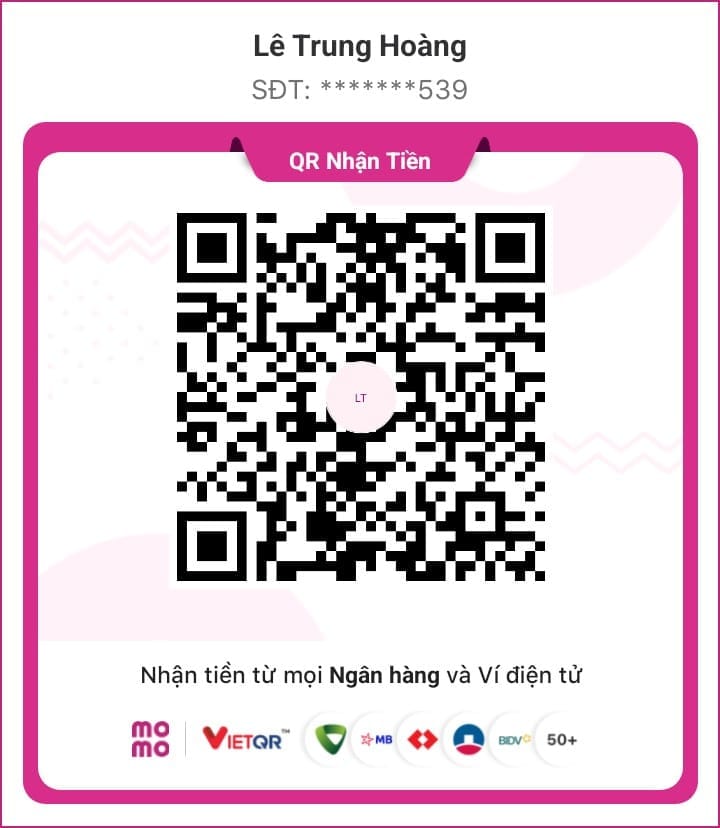
☕ Mời mình một ly cà phê nhỏ?
Nếu bạn thấy nội dung hữu ích, hãy ủng hộ một ly cà phê để mình có thêm động lực phát triển nhé!
LE TRUNG HOANG - 0766734539

📣 Tham gia nhóm Zalo hỗ trợ
Nhận trợ giúp, cập nhật kiến thức và chia sẻ tài nguyên miễn phí cùng cộng đồng:
👉 Tham gia nhóm Zalo- Hàng Loạt Website Bị Sập Vì Đâu? Sự Thật Đằng Sau Cuộc Khủng Hoảng Bảo Mật PHP Tháng 10/2026
- 12 Lỗ Hổng Bảo Mật PHP Nguy Hiểm: Nguyên Nhân, Rủi Ro Và Cách Phòng Tránh Năm 2026
- Mua Tài Khoản Muse AI 1 Tỷ Token Giá Chỉ 90K
- Link Nâng Cấp Antigravity 18 Tháng Chỉ 100K – Giá Rẻ Tại MuaThemeWPGiaRe
- Sharecode Perfex CRM – Powerful Open Source CRM
Thông báo chính thức: Muathemewpgiare chân thành mong muốn được đồng hành và hỗ trợ tốt nhất cho các khách hàng trong quá trình sử dụng giao diện WordPress. Vì vậy, khi mua những theme wordpress tại chúng tôi, chúng tôi cam kết hỗ trợ quý khách hàng hết sức có thể.
Chúng tôi hiểu rằng sự lựa chọn của quý khách là rất quan trọng. Việc mua source code tại chúng tôi không chỉ giúp đảm bảo chất lượng mà còn nhận được sự hỗ trợ tận tâm từ Muathemewpgiare. Chúng tôi rất mong quý khách cân nhắc kỹ, tránh những rủi ro không đáng có khi mua các source code không rõ nguồn gốc. Chúng tôi luôn sẵn sàng hỗ trợ và đồng hành cùng quý khách. Xin chân thành cảm ơn!
Bài viết cùng chủ đề:

Hàng Loạt Website Bị Sập Vì Đâu? Sự Thật Đằng Sau Cuộc Khủng Hoảng Bảo Mật PHP Tháng 10/2026

12 Lỗ Hổng Bảo Mật PHP Nguy Hiểm: Nguyên Nhân, Rủi Ro Và Cách Phòng Tránh Năm 2026
Tài khoản Claude Code có dùng chung được không? Giải đáp chi tiết

Top 10+ đơn vị cung cấp tên miền uy tín tại Việt Nam

Astra Pro Trọn Bộ: Theme Astra, Key Kích Hoạt Nhiều Web

Plugin Thanh Toán WordPress + App Đọc Giao Dịch FREE 1 Năm
Top 100 Model AI Mạnh Nhất Thế Giới 2026: Phân Tích Chi Tiết

GPT-6 Astra: Thế hệ trí tuệ mới với khả năng suy luận, lập trình vượt trội

Đại lễ 2/9 – Giảm giá đến 40% tại MuathemeWPgiare.com

Kinh nghiệm chọn theme WordPress phù hợp cho website của bạn

Kiểm tra tốc độ load theme: Hướng dẫn đơn giản trước khi mua

Hướng dẫn chọn theme WordPress chuẩn SEO cho website hiệu quả

Lý do bạn nên chọn thiết kế website uy tín tại Ninh Bình

Claude qua GitHub Copilot: so sánh Claude Code và GitHub Copilot trong lập trình

Thông Báo Chính Thức: Ngừng Cung Cấp Website Và Theme Cho Lĩnh Vực Tài Khoản Game, Vật Phẩm Ảo

Có nên mua Theme trên ThemeForest? Phân tích ưu, nhược điểm